NJ TRANSIT Mobile App
- 3.1
- Rating
- 1.00M
- Installs
- Free
- Price
 Analysis by App-foxy
For anyone who uses New Jersey public transportation regularly, the NJ TRANSIT Mobile App is more useful than a simple route finder. I found it most valuable as a practical travel companion: it brings trip information and ticket purchasing into one place, so I do not have to switch between a timetable, a browser, and a separate payment method before leaving home. It is a free Maps & Navigation app from NJ TRANSIT, rated for Everyone, and it has become a familiar tool for a large commuter audience, with over one million installs.
My experience was mixed in a realistic way. The app can reduce stress when I already know roughly where I am going, especially when I need to check a departure or handle a ticket quickly. At the same time, it is not a universal replacement for every transit tool. Its strongest value is tied to the NJ TRANSIT network, while people planning a complicated journey across several operators may still prefer a broader mapping service. The most important question is not whether it contains useful information—it does—but whether its presentation works comfortably for the way you travel.
How the app feels to use in everyday travel
I find the app easiest to judge when I focus on its central job: bringing NJ TRANSIT trip information and ticketing together. In everyday use, that can turn a rushed platform decision into something I handle before leaving, though it still helps to know the route I want. Next, I’ll look at how that preparation changes the way a typical journey unfolds.
You May Also Like

 Blood Strike: 2.5 Anniversary
Blood Strike’s Loadouts Turn Every Drop Into a Tactical Gamble
A close look at Blood Strike’s custom loadouts: how fast access to signature weapons reshapes its battle royale rhythm, rewards preparation, and narrows the gap between fights.

 Pandora - Music & Podcasts
Pandora’s Music Is Easy to Start, but Harder to Recover
Pandora’s strength is its low-effort path from a seed to a station. Its weak spot is how much confidence it asks you to place in connection, setup, and quiet recovery.

 8 Ball Pool
 Is Built on Rivalries, Rematches, and Routine
A close look at the rivalries, rematches, shared routines, and unanswered safety questions that turn a quick pool match into a persistent mobile community.

 Samsung Music
’s Quiet Strength Is Playing What You Already Own
Its reach comes less from spectacle than from dependable access to a personal library. That simplicity is both the app’s strongest retention engine and its ceiling.

 AccuWeather: Weather Radar
AccuWeather Review: A Quick, Clear Forecast for Everyday Decisions
For everyday plans, the best forecast is the one you can understand quickly. AccuWeather makes rain timing, radar, and local conditions easy to act on, with a few trade-offs.

 Hill Climb Racing
Why Hill Climb Racing Still Turns Crashes Into One More Run
A tiny car, a bumpy hill and one more upgrade: Hill Climb Racing keeps resurfacing because its simple chaos makes every near-miss feel personal.
More From Our News Desk



Readability and navigation for a quick decision
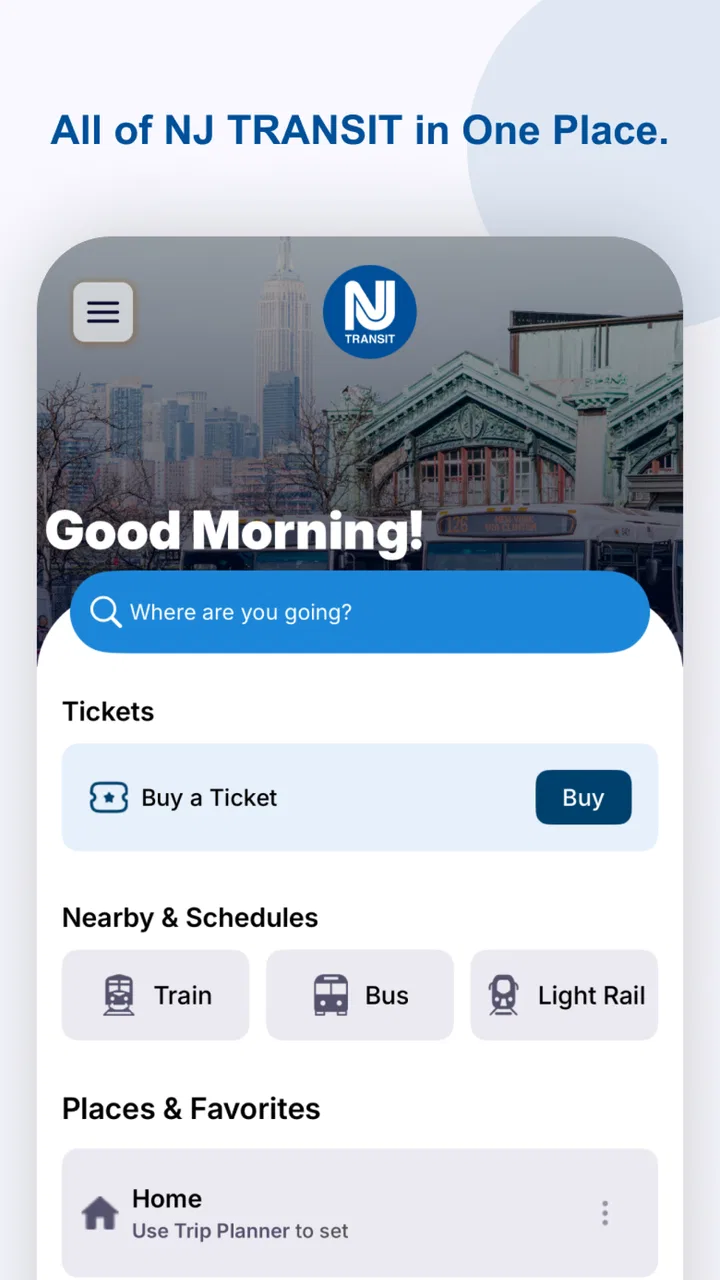
The first thing I look for in a transit app is whether I can answer a basic question quickly: when is the next practical trip? NJ TRANSIT Mobile App is built around that kind of need rather than around sightseeing or general map exploration. That focus is helpful when I am standing near a station, preparing to leave work, or checking the return journey before boarding.
The app’s purpose is easy to understand because it stays close to NJ TRANSIT information and ticketing. I do not have to guess whether a result belongs to the correct transportation provider. That direct connection is one of its advantages over a general-purpose maps app, which may combine rail, bus, walking, and private-car suggestions in a way that is comprehensive but less focused.
For readability, the real test is not simply whether text can be seen. It is whether the important details stand out when I am in a hurry. Departure information, route choices, and ticket actions need different levels of attention, and I found the app most comfortable when I approached it with a specific task already in mind. If I am casually exploring several possible routes, the experience feels less effortless than using a large mapping platform designed for open-ended trip planning.
A useful habit is to check the journey before reaching the station instead of waiting until the platform. This gives me time to read the results, compare alternatives, and complete ticket steps without the pressure of a crowded entrance or a weak connection. It also makes the app easier to use for people who need more time to process changing information, rather than making a purchase or travel decision in a few rushed taps.
The interface is best understood as an operational tool. It is not the sort of app I open for a polished visual overview of an entire city. That trade-off can be positive for a regular NJ TRANSIT rider, because a narrower purpose often means fewer irrelevant choices. It can be less satisfying for a visitor who wants one screen covering every possible operator, attraction, and walking option.
Motor and sensory considerations
Transit apps are often used in awkward conditions: one hand is holding a rail, the other is carrying a bag, and the phone may be exposed to glare or movement. In that setting, the ability to complete a small number of clear actions matters more than having an impressive collection of tools. I found the app most manageable when I prepared the trip in advance and avoided trying to perform several tasks while walking.
Ticketing deserves particular attention. Buying before boarding can be convenient, but it also creates a sequence that should not be left until the last moment. Someone with limited dexterity, tremor, reduced touch accuracy, or difficulty reading small interface elements may benefit from opening the app early, selecting the intended journey slowly, and confirming the ticket before entering a busy station area. That workflow is not glamorous, but it reduces the number of precise actions required under pressure.
For users with visual or sensory needs, the app’s usefulness depends on how comfortably the phone itself can be configured. Larger system text, display magnification, screen-reader settings, and stronger contrast can help where supported by the device and the app’s interface. I would still test the exact screens that matter most—trip selection, ticket purchase, and ticket display—before relying on the app for an unfamiliar journey. Accessibility is not just about the home screen; it is about whether the complete travel sequence remains understandable.
Audio-sensitive users may prefer to prepare in a quiet place, because stations and vehicles are already demanding environments. A phone can be difficult to read in bright sunlight, and a spoken prompt may not be practical in a noisy terminal. I would not treat the app as the only source of awareness for someone who may miss visual or audible announcements. The safest approach is to combine the app with station signage, staff assistance when needed, and enough time to verify the platform or boarding location.
One non-obvious strength is that the app can move some of the decision-making away from the station. That matters for people who find crowds, noise, or time pressure exhausting. Checking information and handling a ticket at home can make the physical journey simpler, even if the app cannot solve every accessibility issue once the rider is on the network.
Situational access: commuting, errands, and unfamiliar trips
My favorite use case is the ordinary weekday commute. Before leaving, I check the service information, decide which departure makes sense, and deal with the ticket while I still have a stable connection and a free hand. Once I arrive at the station, I am not trying to learn the app and navigate the terminal at the same time. This small change in timing makes the product feel much more dependable.
It also works well for an occasional rider who already knows the origin and destination but does not want to manage a paper ticket or search through several NJ TRANSIT pages. The app puts the provider’s information and the purchase step together, which can be reassuring for someone making a short visit or an appointment-related trip. I would still allow extra time for a first use, since unfamiliar users may need to understand the ticket flow before they are comfortable.
For a caregiver traveling with a child, an older relative, or someone who needs additional support, preparation is especially useful. I would review the route together, confirm the intended travel details, and make sure the ticket is ready before entering the station. The app can support that shared planning, but it does not remove the need to explain where to wait, how to recognize the vehicle, or what to do if plans change.
People who are frequently offline or who travel through areas with unreliable connectivity should think carefully about timing. I would not wait until the last seconds before boarding to load essential information or complete a purchase. A better workflow is to prepare while connected and keep the phone charged. This is a general travel precaution, but it is particularly important when the app is being used as both an information source and a ticket tool.
Visitors may find the app useful once they understand the NJ TRANSIT portion of their trip. It is less ideal when the journey begins with one operator and ends with another, or when the main challenge is finding a walking entrance, a private shuttle, or a complex transfer outside the NJ TRANSIT system. In those situations, I would use a general mapping app for the wider itinerary and turn to NJ TRANSIT Mobile App for the provider-specific part.
Where it compares well with usual alternatives
Compared with a paper timetable, the app is more convenient because information and ticketing are available from the same mobile tool. Compared with searching the web, it feels more direct for a rider who already knows that NJ TRANSIT is the relevant provider. These are meaningful advantages, particularly for repeat journeys where speed and familiarity matter more than broad discovery.
Compared with general mapping apps, its benefit is specialization. A broad map may be better at combining walking directions, several transit agencies, cycling, and driving in one itinerary. NJ TRANSIT Mobile App is the more natural choice when I want to stay close to the operator’s own travel information and ticket process. I would not force one app to do the other app’s job.
There is also a trust advantage in using the provider’s own application for a provider-specific task. The developer is NJ TRANSIT, and the app’s purpose remains tightly connected to that network. That does not mean every user will find every screen perfect, but it does mean the product is aimed at the people who actually need NJ TRANSIT information rather than at a worldwide audience.
The store rating sits at a 3.6 average from around 18 thousand ratings, with roughly 7.6 thousand written reviews. I read that as a sign of practical usefulness mixed with recurring friction, not as a reason to dismiss the app. Transit software is judged during stressful moments, so small problems with clarity, timing, or ticket handling can affect opinions strongly. Its broad adoption suggests that many riders still consider it worth keeping available.
Remaining barriers and points of friction
The biggest limitation is dependence on a focused network. If I am planning a journey that crosses several transit providers, I need another tool for the complete picture. The app can remain useful for the NJ TRANSIT leg, but expecting it to coordinate every surrounding detail would make the experience unnecessarily complicated.
Another barrier is the difference between having information and understanding it under pressure. A rider may see a departure option yet still need help interpreting a transfer, a station entrance, or a change in plans. This is especially relevant for people with cognitive disabilities, limited language confidence, or little experience with public transportation. The app can support a plan, but a plan is not the same as step-by-step assistance in every physical setting.
Ticketing can also create a practical burden for users who struggle with small controls, confirmation screens, or fast-changing travel decisions. My advice is to treat the purchase as a preparation task, not as something to begin while boarding is imminent. If another person is helping, agreeing in advance who will hold the ticket and who will monitor the journey can prevent confusion.
Phone dependence is another consideration. A dead battery, damaged screen, inaccessible settings, or difficulty unlocking the device can turn a convenient digital ticket into a stressful obstacle. I would keep the phone charged and avoid making the app the only record of a critical journey. Station staff, signage, and a backup plan still matter, particularly for riders who cannot easily troubleshoot a device in public.
The app’s Everyone content rating makes it suitable in age terms for a broad audience, but age suitability should not be confused with effortless accessibility. A child, older adult, or person who needs assistance may still require another traveler to help with route choices or ticket preparation. The right question is whether the individual can complete the whole workflow comfortably, not merely whether they are allowed to install it.
Version, value, and who should use it
NJ TRANSIT Mobile App is free, which removes the main financial barrier to trying it. It has been available since Apr 24, 2013, and the current version is 2025.1.1A. The minimum operating system is 10, so anyone using an older device should check compatibility before building a travel routine around it.
I recommend it most strongly to regular NJ TRANSIT riders, occasional passengers who want provider-specific information, and anyone who prefers preparing a mobile ticket before arriving at the station. It is also a sensible companion for users who benefit from reducing last-minute decisions, provided they test the important screens with their own phone settings and accessibility needs.
I would skip relying on it as the sole travel planner if I were coordinating a multi-operator trip, traveling with no dependable way to charge my phone, or needing highly guided turn-by-turn support through every station and transfer. In those cases, I would combine it with a general map, human assistance, or a printed backup rather than expecting one specialized app to cover every situation.
My inclusive verdict
After using it as a practical transit tool, I see NJ TRANSIT Mobile App as a worthwhile companion rather than a complete answer to accessible travel. Its focused connection to NJ TRANSIT, combined information and ticketing, and free access make it genuinely useful for everyday riders. The best results come from opening it early, preparing the ticket before the rush, and using device settings that make reading and tapping more comfortable.
Its inclusive value is strongest before the journey begins. It can give riders more control over timing, reduce the need to handle paper, and let people review a trip in a calmer environment. Its weaker side appears when a user needs broad multi-agency planning, detailed physical guidance, or a dependable alternative to a phone. Those are important boundaries, not minor technicalities.
My final recommendation is simple: install it if NJ TRANSIT is part of your regular travel, but practice the complete workflow before an important trip. Check how easily you can read the route information, select the right ticket, and display it when your phone is configured for your needs. The most accessible way to use this app is to turn a rushed station task into a prepared journey. With that approach, it earns a place alongside—not necessarily instead of—your usual maps, backup plans, and real-world transit support.
FAQs for NJ TRANSIT Mobile App
01What features does the NJ TRANSIT Mobile App offer?
The NJ TRANSIT Mobile App provides a range of features including real-time train and bus schedules, trip planning, and service alerts. It also offers mobile ticketing, allowing users to purchase and display tickets directly from their smartphones. Additionally, users can access station information and view maps for seamless navigation.
02How does mobile ticketing work on the NJ TRANSIT Mobile App?
Mobile ticketing on the NJ TRANSIT Mobile App allows users to buy and display tickets directly from their phones. After purchasing, tickets are stored in the app and can be activated just before boarding. This feature provides a convenient alternative to physical tickets, reducing the need for paper and speeding up the boarding process.
03Is the NJ TRANSIT Mobile App available for both Android and iOS devices?
Yes, the NJ TRANSIT Mobile App is available for both Android and iOS platforms. Users can download it from the Google Play Store for Android devices and the Apple App Store for iOS devices. The app is designed to offer a consistent experience across both operating systems, ensuring accessibility for all users.
04Can I receive service alerts and notifications through the NJ TRANSIT Mobile App?
The app provides users with real-time service alerts and notifications, keeping them informed about any disruptions or changes in service. Users can customize their alert preferences to receive updates relevant to their specific routes or services. This feature ensures travelers can plan their trips more effectively and avoid unexpected delays.
05Are there any costs associated with using the NJ TRANSIT Mobile App?
Downloading and using the NJ TRANSIT Mobile App is free. However, purchasing tickets through the app incurs the normal fare charges. There are no additional fees for using mobile ticketing or other features within the app. It’s a cost-effective way to manage your transit needs with added convenience.
Pros
- Easy-to-navigate interface for quick access.
- Real-time updates on train and bus schedules.
- Secure mobile ticketing for hassle-free travel.
- Personalized notifications for service alerts.
- Integrated trip planner for efficient routing.
Cons
- Occasional bugs in ticket purchasing process.
- Limited offline access to schedule information.
- Infrequent app updates can lead to outdated info.
- GPS location services drain battery quickly.
- Requires strong internet connection for updates.

NJ TRANSIT Mobile App
Gallery